Windows Readiness
Use Cases
ManagementStudio helps organizations prepare their devices, applications, and users for Windows changes, reducing risk and ensuring a smooth transition before deployment.
As organisations plan their move to Windows 11, the challenge is no longer just upgrading devices, programme teams need to orchestrate a complex change programme across hardware, security, applications, and users. New Windows 11 requirements mean readiness varies widely across the estate, making it difficult to establish a clear baseline, prioritise actions, and build a credible roadmap. Without a single, trusted view of readiness, programmes risk delays, scope creep, and unplanned cost.
ManagementStudio helps programme teams move from uncertainty to control by providing clear, actionable insight into Windows 11 readiness across the organisation. Through built-in reporting and our Engage assessment service, PMOs and architects can quickly understand eligibility, identify constraints, and align stakeholders around a shared plan. The result is a data-driven upgrade programme that supports better decision-making, clearer communication, and a smoother transition to Windows 11.

Capture
Using ManagementStudio’s data capture technologies (either using connectors, manual import or forms input) it’s a simple step in getting that first view of what your estate looks like under the microscope. In the picture below, we have used the SCCM and AD connectors to bring in machine based data. All the attributes needed for the report are brought in as standard, however it’s an easy job to add other attributes that may be important to your specific requirements.
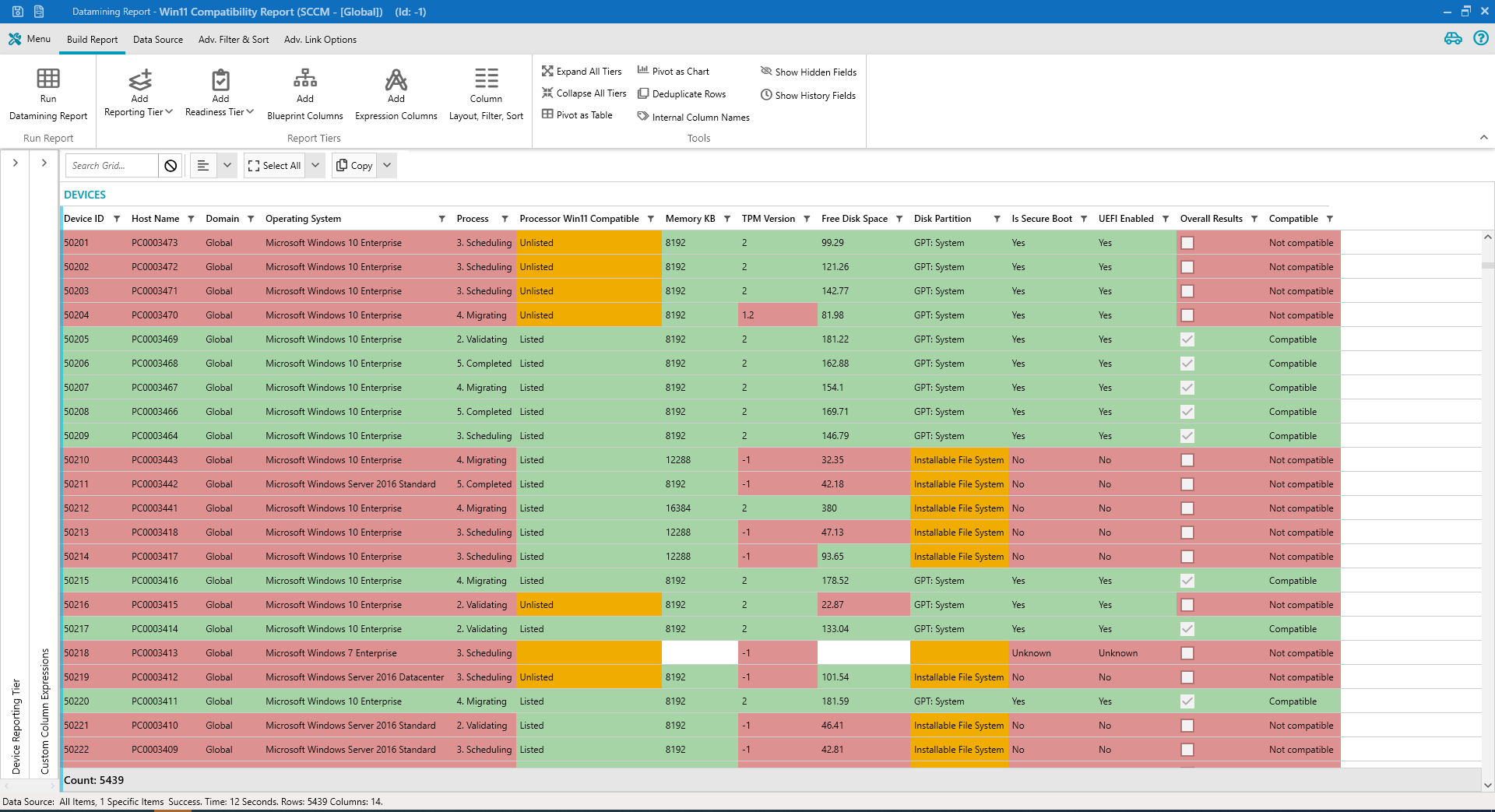
Once imported, you can select all of the devices and run the built in Windows 11 Data Mining Report that will tell you how the current estate looks.
It’s usually not a pretty picture, but at least you now know the scope and what needs to be done.

Control
Using the imported data from your machine estate, we can start to understand what Make/ Model of machine is going to be suitable for Windows 11, what machines can be upgraded and more specifically what needs to be done to each machine. From here, we can use the conditional automation engine to pick out devices that can be manually upgraded, and farm them out to the correct team. Moving the devices along the change process as we do this. Devices that cannot be upgraded can be marked for decommission and set down the decommissioning and new order process.
Some changes can be carried out using SCCM. These changes can be automatically scheduled to occur in the evening and reported back to ManagementStudio so that we always have an up to date view of what is going on.
Further reporting will allow us to see what the financial and business impact is going to be with this update and enable a company to plan and schedule over the next couple of years. This means we can start to think about the Windows 11 update more like a BAU activity rather than a completely new project.
Don’t forget, we will also need to test the application estate and business processes against the new operating system. Automated readiness on a machine, application, person perspective will enable the company to make this transition in a very “under the radar” way, while mitigating all risks, documenting all actions and make change in a steady, controlled way.

Communicate
As always, communication is key. We will need to tell users what is going to happen, whether they will be trained, or what training materials are available. The busines may wish to have their employees self schedule their device update, or it could be that they will be having a totally new device delivered to their desk or home. Testing the operating system against the application estate and business processes will need to be done in key areas. There could also be the requirement to have a set of T-minus emails detailing what’s happening at each step. An informed and included employee is a happy employee and communication should be one of the core pillars of any business change.

Collaborate
Having all of this data together, interlinking with other components of the company (users, devices, applications etc) means that we now have an extensive knowledge base. This knowledge base grows with every iteration. Not just for this Windows 11 change, but for the next change, and the one after that. As you progress, the knowledge will become more refined and accurate. Change will become easier.
With it’s easy to use interface and the ability to finely control what can be seen by each user, ManagementStudio will soon become the collaboration solution within your organisation for all projects, transformation and change processes.
Try ManagementStudio
See how ManagementStudio can help in your organisation with a free, fully functional 30-day Proof of Concept.